Validating the SVCMON

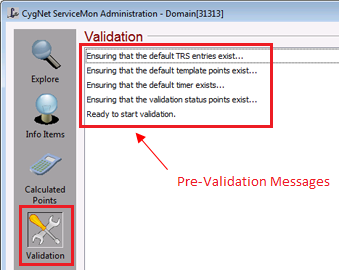
Validation is performed on the Validation view. When you click on the Validation view icon, a pre-validation run is performed and any necessary components needed for a full validation are automatically added. This includes adding the SVCMON UDCs to the Table Reference Service, ensuring the default point templates exist in the Point Service, and ensuring the SVCMON has a default timer. Once the pre-validation is complete, the view will show "Ready to start validation."

Validation

Validation

Validation Checks

The first task that should be performed with the CygNet ServiceMon Administration utility is validating the service. Validation performs the following checks:

Check Description

Point versions

  • Checks to see if the SVCMON and its associated Point Service are in sync by comparing each point’s record version.
  • Checks for points that are in the SVCMON but are not in the Point Service.

TRS Entry Validation

  • Checks to see if the TRS associated with the SVCMON contains all needed info item definitions.
  • Checks that calculated UDCs have source UDCs, have units that are convertible from the source UDCs units.
  • Checks that the table entries in ~UDCCALC and ~UDCSVM match those in ~UDCALL.

Templates

Checks to see if template points have any invalid properties. These properties include:

  • General 2 — verified against the defined info item for info item template points
  • Scaling
  • Point Type
  • Description
  • Reference point.

If the point is a timer template point, ensures it doesn’t have a timer specified in the Point Reference property.

Tag Facility IDs

  • Checks all points in the SVCMON to ensure that they all have specified a Facility ID.

Tag Long ID format (FACILITY_UDC)

  • Checks that the Long Point ID is in the format FACILITY_UDC. This is the required format for SVCMON points.

Info Item point validation

Checks all SVCMON info item points to make sure that they have valid configurations.

  • Ensures the point has a UDC.
  • Ensures General 1 and Facility ID are in sync.
  • Ensures Units match the defined units.
  • Ensures Scaling is not enabled.
  • Ensures that if the Point Type is an "Enumeration" point that it has an Enumeration Table matching the template.
  • Ensures Point Types match between templates.
  • Ensures that if the point is configured to be a calculated point, that its UDC is in ~UDCCALC, it has all the right Format Data for a calculated point, and that the Table Driven 1 field is set to the calculation type.

Calculated point validation

Checks all SVCMON calculated points to make sure that they have valid configurations.

  • Ensures that the Table Driven 1 field is valid (that it’s a rate point, scaled, or delta).
  • Ensures that the defined source UDC, Units, and Table Driven 1 (in the TRS format data) properties all match up with the fields in the point record.
  • Ensures that the point has a base point.
  • Ensures that the point’s base point is on the same timer as this point.
  • Ensures that scaling is correct.
  • Ensures that the units for this point are convertible from the units for the base point.

Well-defined point validation

  • Checks all SVCMON well-defined points to make sure that they have valid configurations. Well-defined points are points of which SVCMON has intrinsic knowledge. These are points with UDCs for the service ping time, site ping time, service status, and site status. For the "Site" UDCs, checks that the Facility is a valid Site.
  • Checks that the General 1 and Facility ID properties are in sync. If the General 1 data field isn’t specified, checks that it can resolve the Facility ID to a Site.Service (it cannot if there is more than one underscore in the name).

Timer point validation

  • Checks all SVCMON timer points to make sure that they have valid configurations.
  • Checks that the Facility ID is not empty.
  • Checks that the timer isn’t a template, that the timer’s value is numeric, and that the value is within the defined range.
  • Checks the Units.
  • Checks that the timer has only one timer error tag, cycle time tag, and cycle state tag.

Cycle point time validation

  • Checks all SVCMON cycle time points to make sure that they have valid configurations. The basic check for FACILITY_UDC is the Long Point ID.
  • Checks to see that it has exactly one timer point.
  • Checks that it has no Reference point.
  • Checks for empty Facility.
  • Checks that the General 1, General 2, and Table Driven 1 properties are empty.

Cycle stated point validation

  • Checks all points in the SVCMON to ensure that they all have specified a Facility ID.

ServiceMon validation

  • Checks that the Long Point ID is in the format FACILITY_UDC. This is the required format for SVCMON points.

Click the Start button to start validation. Once validation is complete, the Validation view will show Completed ServiceMon Validation and will list the results. You should scroll through the result list to view and correct any anomalies and exceptions before proceeding with other SVCMON tasks.

During the validation process the following points are created to monitor SVCMON configuration errors and warnings. The facility of these points is SITE_SVCMONServiceName (for example, CYGSITE1_SVCMON). These points are updated by the SVCMON service every few hours and can be configured with alarm setpoints and to report to history. Once these points are created, they are update by the service, not the ServiceMon Administration Utility.

UDC Description Point Type Service Type(s) Data Scope

SVMCONFERR

ServiceMon Config Errors

Analog Input

SVCMON

Single Service

SVMCONFWRN

ServiceMon Config Warns

Analog Input

SVCMON

Single Service

See Fixing Configuration Errors Found During Validation for information about the buttons on the Validation view.


More:

Back to top